


Did you know your website could be contributing to climate change? The internet accounts for 3.7% of global carbon emissions, and every page view generates about 0.8 grams of CO₂. For eCommerce businesses, switching to green hosting is a practical way to reduce emissions while meeting customer expectations for sustainability. Here’s how you can set up green hosting without sacrificing performance or reliability:
- Why Green Hosting Matters: It reduces your carbon footprint and aligns with consumer demand – 45% of shoppers prefer eco-conscious brands, and 66% are willing to pay more for sustainable options.
- What to Look For: Choose providers with energy-efficient data centers (PUE under 1.3), renewable energy certifications, and features like NVMe SSDs for speed.
- Steps to Get Started: Identify your hosting needs, compare providers, migrate your site securely, and optimize for energy efficiency with tools like CDNs and green coding practices.
Switching to green hosting isn’t just better for the planet – it can also improve your site’s performance and resonate with eco-conscious customers. Read on for a step-by-step guide to make the transition smooth and effective.
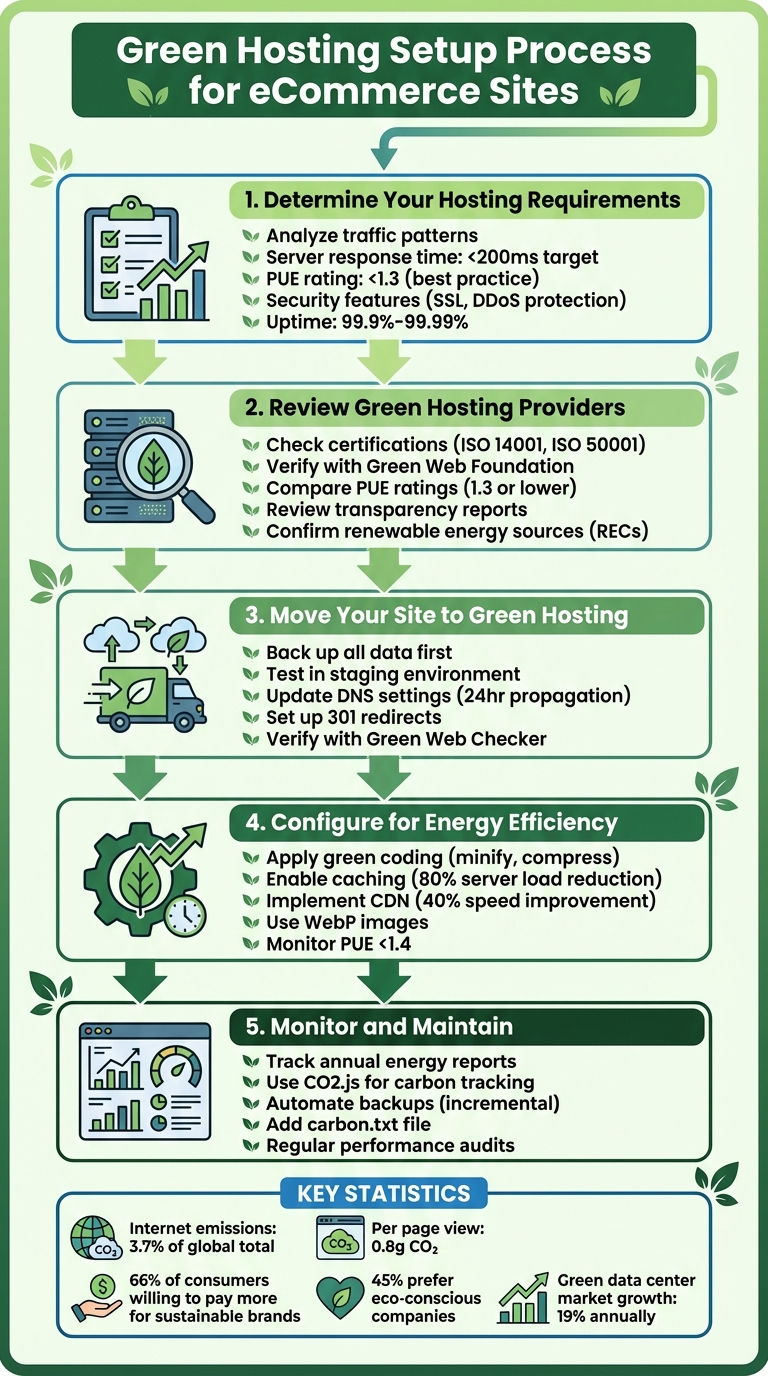
5-Step Green Hosting Setup Guide for eCommerce Websites
GreenGeeks Review | Eco Hosting Performance: Speed And Usability Tested

Step 1: Determine Your eCommerce Hosting Requirements
Before diving into comparisons of green hosting providers, it’s important to figure out what your online store actually needs. The goal isn’t just to find the cheapest plan – it’s about matching your technical requirements with a hosting solution that can handle your busiest sales days while staying energy-efficient.
Analyze Traffic and Performance Needs
Start by examining your website analytics. Tools like Matomo or Google Analytics can help you understand how many visitors you’re getting, when traffic peaks, and how much server power you’re using. Features like high-resolution images, real-time transactions, and data management can significantly increase energy demands.
When choosing a green host, prioritize those with server response times under 200 milliseconds. Look for optimized stacks and NVMe SSDs, which speed up processing and reduce the server’s active time – ultimately cutting energy consumption. Also, check the provider’s Power Usage Effectiveness (PUE) rating. A PUE close to 1.0 signals a highly energy-efficient data center, while anything under 1.3 is considered top-tier in the industry.
Security also plays a surprising role in sustainability. The WordPress Hosting Handbook highlights this:
Security is paramount… Hackers and dangerous bots can overload your servers and generate unwanted power and data impacts.
By blocking malicious traffic, you can reduce unnecessary energy use.
Define Security and Compliance Requirements
Since your eCommerce site handles sensitive payment data, having a secure setup isn’t optional – it’s essential. A secure and compliant hosting environment also prevents unnecessary resource use, aligning with sustainable hosting principles. Look for providers that offer features like free SSL certificates, DDoS protection, brute force defense, and 24/7 malware scanning. These tools protect your customers while also preventing energy waste caused by breaches or malicious activity.
If your site processes payments, ensure the hosting provider supports PCI compliance. For businesses serving international customers, data residency requirements are another key factor. For instance, if GDPR applies to your operations, confirm that the hosting company is legally based in the EU rather than simply renting server space there. Finally, aim for a provider that guarantees uptime between 99.9% and 99.99% – this protects your revenue and ensures efficient use of resources.
Plan for Scalability and Business Growth
Your hosting needs will grow as your business expands, so planning for scalability is crucial. A hosting provider with autoscaling capabilities can dynamically adjust resources like RAM or PHP workers during traffic surges and scale back during slower periods, saving energy and costs. Early planning for scalability also helps you avoid the hassle and expense of energy-intensive migrations down the road.
Green hosting providers often use virtualization, allowing multiple servers to run on a single energy-efficient machine. This is especially useful during high-traffic periods like Black Friday or holiday sales, when demand can skyrocket. As InMotion Hosting explains:
It’s smart to pick a host that can scale with you. This way, you won’t need to worry about outgrowing your current plan and making a stressful switch later on.
Adding a Content Delivery Network (CDN) from the start is another smart move. CDNs cache your content closer to users around the world, reducing the load on your main server and cutting down on the energy required for long-distance data transfers. This combination of scalable hosting and distributed content delivery ensures that your growth stays efficient and sustainable.
Once you’ve outlined your hosting needs, you’ll be ready to explore green hosting providers in the next step.
Step 2: Review Green Hosting Providers
After identifying the specific needs of your eCommerce site, the next step is to assess which green hosting providers genuinely uphold eco-friendly practices. The challenge lies in separating legitimate sustainability efforts from mere marketing claims. This analysis is crucial in choosing a provider that aligns with both your environmental and performance objectives.
Check for Certifications
Start by examining third-party certifications that validate a provider’s environmental promises. The Green Web Foundation offers a public directory of verified green hosting providers. In the U.S., the EPA’s Green Power Partnership provides trustworthy benchmarks.
Look for providers that employ credible renewable energy strategies, such as Renewable Energy Certificates (RECs) or on-site renewable energy generation. For carbon offsets, ensure they adhere to recognized standards like the Gold Standard or Verified Carbon Standard (VCS).
Operational certifications like ISO 14001 and ISO 50001 are additional signs of a provider’s commitment to environmental responsibility. When it comes to hardware disposal, certifications such as R2 or e-Stewards ensure that retired equipment is recycled responsibly – a critical factor, given that only about 20% of global e-waste is recycled.
Review Transparency and Accountability
Reliable green hosting providers back up their claims with verifiable data. For example, the Green Web Foundation requires evidence from the most recent full calendar year. As InMotion Hosting advises:
"Not all ‘100% renewable’ claims are equal. Before committing to a provider, dig into how they actually source their energy."
Ask for energy mix reports from the previous year or, if necessary, request redacted energy invoices. Some providers even publish a carbon.txt file on their domain, making sustainability data publicly accessible.
Tools like Electricity Maps can also help you assess real-time greenhouse gas emissions for the regional grid where the provider’s data center operates. These steps allow you to verify whether a provider’s green claims hold up in practice, paving the way for evaluating energy efficiency metrics like PUE.
Compare Power Usage Effectiveness (PUE) Ratings
PUE (Power Usage Effectiveness) is a critical metric for assessing data center energy efficiency. It measures the ratio of total facility energy use to the energy consumed by IT equipment. A PUE of 1.0 is ideal, while higher values indicate additional energy use for cooling, lighting, and other non-IT operations.
"A data center PUE of 1.3 or lower is currently considered best practice." – .eco
Request PUE figures from the previous year instead of relying on future projections. Geography also plays a role in PUE efficiency; data centers in cooler regions, like Northern Europe or Canada, often achieve lower PUE ratings due to reduced cooling energy needs. For instance, in 2024, Amazon Web Services reported a global PUE of 1.15, with its most efficient European data center achieving an impressive 1.04.
Keep in mind that low PUE values must be coupled with verified renewable energy use to ensure a meaningful environmental benefit.
Step 3: Move Your Site to Green Hosting
Once you’ve chosen a green hosting provider, it’s time to plan your site migration carefully. This process ensures your data stays secure and downtime is kept to a minimum. Jennifer Fan, Digital Content Producer at InMotion Hosting, emphasizes the importance of preparation:
"Switching to new hosting, especially green web hosting, is a complex task. However, with a clear plan and the right provider, it can be a smooth and rewarding process for your business."
Here’s how to transition your website to its new green hosting environment without unnecessary hiccups.
Back Up Your Website Data
Before anything else, back up all your website files, databases, and configurations. This step is non-negotiable. If you’re running an eCommerce platform like WordPress, Magento, or WooCommerce, double-check that it’s compatible with your new hosting environment. Plan the migration for off-peak hours to reduce disruptions and notify your customers about the scheduled maintenance in advance.
Test the Move in a Staging Environment
A staging environment is your safety net. It lets you test the migration without affecting your live site. Many hosting providers simplify this process with "push and pull" tools that make transferring updates between staging and live sites straightforward. To prevent search engines from indexing your staging site, use password protection and add noindex meta tags.
Run a thorough technical audit using tools like Screaming Frog or SEMrush to catch issues such as broken links, 404 errors, missing canonical tags, or duplicate headers. Test critical features like your eCommerce checkout, contact forms, and search functionality to ensure everything works seamlessly on the new server. Lastly, assess Core Web Vitals and site speed to confirm your green host delivers the performance you need.
Update DNS and Test Website Functions
Once your staging site runs smoothly, update your domain registrar with the new name servers provided by your green host. Keep in mind that DNS changes can take up to 24 hours to fully propagate. To maintain your SEO rankings and avoid broken links, set up 301 redirects for any URLs that have changed. After updating DNS, test your website’s speed, redirects, and interactive elements.
Don’t forget to update your robots.txt file and submit a fresh XML sitemap to search engines to ensure proper indexing. Use the Green Web Checker to verify that your new IP address is recognized as a green hosting provider. Finally, compare your site’s performance metrics before and after migration. Monitor it closely over the next few days to catch and resolve any issues with uptime, speed, or functionality.
sbb-itb-0d018d1
Step 4: Configure Hosting for Energy Efficiency
Switching to green hosting is a great start, but there’s more you can do to cut down on energy consumption while maintaining top-notch performance. Did you know the internet is responsible for about 3.7% of global carbon emissions? On average, a single web page generates around 0.8 grams of CO₂ per view. By fine-tuning your hosting setup, you can make a meaningful impact.
Apply Green Coding Practices
Efficient code isn’t just good for performance – it also minimizes energy use. Here are some ways to streamline your code:
- Minify CSS, JavaScript, and HTML.
- Use modern image formats like WebP and enable compression.
- Activate lazy loading for images and videos.
- Turn on caching, which can cut server load by up to 80%.
- Opt for lightweight frameworks – Vue.js, for instance, is far less demanding than AngularJS, which can weigh in at 550–600KB.
- Audit your code regularly to remove unnecessary scripts.
- Disable auto-playing videos.
Every kilobyte saved reduces the energy needed to process and deliver your site, making it more sustainable.
Use Content Delivery Networks (CDNs)
CDNs are a smart way to distribute your site’s static content – like images, CSS, and JavaScript – across multiple servers around the world. By delivering data from the server closest to each visitor, CDNs reduce the energy required for data transfer and can speed up your site by about 40%. Plus, they ease the load on your origin server, improving resource efficiency and cutting power consumption.
"CDNs allow for long-lived content (like images, CSS, JS, and even entire HTML pages) to be duplicated and stored in multiple locations around the globe… This results in it using less network resource, and by doing so contributes to reducing the network energy required to view a site." – Fershad Irani, The Green Web Foundation
When choosing a CDN, look for providers that automatically optimize images, minify files, and use renewable energy to power their servers. To ensure your CDN is set up correctly, tools like CDN Finder can help verify its functionality.
Track Energy Usage and Server Performance
Keeping an eye on your hosting’s energy efficiency requires ongoing monitoring. Here’s what to focus on:
- PUE Rating: Aim for a Power Usage Effectiveness (PUE) below 1.4.
- Server Response Times: Target a response time of under 200 ms.
- Carbon Intensity: Use tools like the IP to CO₂ Intensity API and CO₂.js to measure the carbon footprint of your hosting setup.
The Green Web Foundation offers free, open-source tools to help you track these metrics. Developers can also use the Grid Intensity CLI for real-time carbon intensity monitoring. Additionally, clean up inactive staging environments and deploy security measures to prevent energy spikes caused by unauthorized traffic. Regular checks ensure your hosting remains efficient as your business grows.
Step 5: Monitor and Maintain Your Green Hosting
Once your green hosting is up and running, the work doesn’t stop there. Ongoing monitoring is key to keeping your hosting efficient and aligned with your sustainability goals. By keeping a close eye on performance and automating essential tasks, you can ensure your hosting setup remains effective as your business evolves.
Track Energy Metrics and Carbon Footprint
Keeping track of your hosting’s environmental impact is crucial for identifying problem areas and measuring improvements over time. Start by requesting annual energy mix reports from your hosting provider. These reports should detail the percentage of energy sourced from the grid versus genuine renewable sources. Don’t settle for projected numbers – ask for actual prior-year Power Usage Effectiveness (PUE) figures to confirm their efficiency claims.
Leverage tools like CO2.js or Cloud Carbon Footprint to estimate and visualize emissions from your website. You can also use the Green Web Check tool to confirm whether your domain is hosted by a verified green provider. For real-time insights, platforms like Electricity Maps reveal the carbon intensity of the energy grids powering your servers.
It’s also important to monitor page-level emissions. Factors like page weight and data transmission contribute to your carbon footprint, and these numbers can add up quickly with high traffic volumes. Establish a baseline measurement to track progress after making optimizations. Even small adjustments can lead to significant reductions when multiplied across thousands of daily visitors. With accurate metrics, you can automate routine tasks to further improve efficiency.
Automate Backups and Updates
Automation plays a big role in maintaining energy-efficient hosting. For example, incremental backups, which save only changed data, use less storage and energy compared to full daily backups. Set up your backup system to run automatically, ensuring minimal server load and maximum efficiency.
Automate other tasks like security scans, backups, and cleanup processes. Tools like WP Scan can help detect vulnerabilities early, preventing them from becoming energy-draining issues. Additionally, use scripts to automatically shut down inactive staging and testing environments – these “zombie” environments consume storage and computing power unnecessarily.
Database maintenance can also benefit from automation. Schedule tasks to clean up overhead, delete expired transients, and remove unused data. These efforts not only secure your website but also reduce redundancy, aligning with your sustainability goals.
Align Hosting with Business Goals
Your green hosting strategy should sync with your overall business objectives, especially if sustainability is a core value. This alignment can also resonate with your customers. Nearly 45% of consumers are more likely to support brands they see as environmentally responsible, and 66% globally are willing to pay more for products from sustainable companies.
One way to showcase your commitment is by adding a carbon.txt file to your domain. This file provides machine-readable sustainability data about your digital operations at /carbon.txt. It’s a simple step that adds transparency and builds trust with eco-conscious customers.
Regularly review your digital footprint to keep things lean. Audit your storage needs and archive or delete unused data to cut down on energy consumption. As your business grows, ensure your hosting provider can scale with you while maintaining a low PUE – ideally 1.3 or lower – and a high percentage of renewable energy use. Also, confirm they hold certifications like R2 or e-Stewards, which guarantee responsible recycling of hardware at the end of its lifecycle.
Conclusion
Green hosting not only enhances eco-efficiency but also strengthens your eCommerce brand and financial performance. By following the five-step process we’ve outlined, you can select a trusted provider, migrate seamlessly, optimize energy use, and maintain a sustainable approach. These steps underscore the practical benefits of adopting green hosting strategies.
The numbers tell a clear story about why sustainable hosting matters. The internet is responsible for about 3.7% of global carbon emissions, a figure comparable to the aviation industry. Each web page view generates approximately 0.8 grams of CO2. Meanwhile, consumer interest in sustainability keeps climbing: 66% of shoppers are willing to pay more for eco-friendly brands, and 45% prefer to buy from companies that demonstrate environmental responsibility. Green hosting allows businesses to tap into this growing demand while shrinking their carbon footprint.
Today’s green hosting solutions also deliver on performance and reliability. Providers leveraging renewable energy and energy-efficient technologies, such as NVMe SSDs, often offer 99.99% uptime guarantees and achieve Power Usage Effectiveness (PUE) ratings of 1.3 or lower. These benchmarks prove that sustainability doesn’t mean sacrificing speed or dependability. By implementing energy-saving measures like WebP images, caching, and CDNs, you can further reduce energy use, improve load times, and boost your SEO rankings – showing that sustainability and performance can go hand in hand.
The green data center market is on track to grow by 19.0% annually, with significant expansion expected through 2030. As regulations become stricter and consumer expectations evolve, businesses that embrace eco-friendly hosting now will be better prepared for the future. Start by verifying your hosting provider’s certifications, requesting detailed energy reports, and applying the optimization techniques outlined here. With the right approach, your hosting infrastructure can become a powerful tool for both environmental responsibility and business success.
FAQs
How can I confirm if a hosting provider’s green practices are genuine?
To ensure a hosting provider’s eco-friendly promises are genuine, start by looking for third-party certifications from reputable organizations that verify sustainable practices. See if they provide clear and current evidence of their renewable energy use, carbon offset programs, or energy-saving initiatives. You can also check if they appear in well-known directories for green hosting. Focus on providers who make their environmental efforts transparent, measurable, and easy to confirm.
What are the main advantages of using green hosting for my eCommerce business?
Green hosting allows your eCommerce site to run on servers powered by renewable energy sources like wind, solar, or hydro. This means your store operates with a smaller carbon footprint, helping your business take a step toward a cleaner planet while meeting the rising demand for eco-friendly practices.
But it’s not just about being environmentally conscious. Green hosting providers often leverage energy-efficient technology, which translates into faster load times, dependable uptime, and strong security measures. These features can improve the overall shopping experience, lower bounce rates, and even drive more conversions – all while conserving energy.
Opting for green hosting can also elevate your brand’s image. Consumers increasingly prefer businesses that actively work to minimize their environmental impact, and this choice can foster customer loyalty and even boost sales. On top of that, energy-efficient operations might help cut costs, and tax incentives could sweeten the deal, making it a smart move for both your bottom line and the planet.
How can I keep my eCommerce site secure and compliant when switching to green hosting?
To keep your eCommerce site secure and compliant while transitioning to a green hosting provider, start by choosing a host that emphasizes security and compliance. Prioritize providers offering features like built-in SSL certificates, firewalls, DDoS protection, and regular software updates. Check for industry-recognized certifications, such as PCI-DSS for payment processing or ISO 27001 for data security, to ensure they meet high standards.
Once you’ve picked your hosting provider, implement these essential steps:
- Activate HTTPS: Use your host’s SSL certificate to secure your site and redirect all traffic through HTTPS.
- Stay updated: Regularly update all software, including plugins and themes, to close security gaps.
- Strengthen login security: Use strong passwords and enable two-factor authentication for admin accounts.
- Back up regularly: Perform daily backups and monitor your site for any unusual activity to address potential threats quickly.
By pairing a secure green hosting provider with these practices, you can minimize your site’s environmental footprint while maintaining top-notch security and compliance.
